Buy payza.eu ?
We are moving the project
payza.eu .
Are you interested in purchasing the domain
payza.eu ?
domain@kv-gmbh.de · 0541-91531010
Buy payza.eu ?
How can one start Valorant without Secure Boot?
To start Valorant without Secure Boot, you can disable Secure Boot in your computer's BIOS settings. First, restart your computer and enter the BIOS settings by pressing the designated key (often F2, F10, or Del) during the boot process. Once in the BIOS settings, navigate to the Secure Boot option and disable it. Save the changes and exit the BIOS settings. After doing this, you should be able to start Valorant without Secure Boot enabled. Keep in mind that disabling Secure Boot may have security implications, so it's important to weigh the risks before making this change. **
How can one play Valorant without Secure Boot?
To play Valorant without Secure Boot, you can disable Secure Boot in your computer's BIOS settings. This will allow you to bypass the Secure Boot requirement and launch the game. However, keep in mind that disabling Secure Boot can make your system more vulnerable to certain types of malware and security threats. It is recommended to re-enable Secure Boot after playing Valorant to ensure the security of your system. **

Similar search terms for Valorant
Top-Angebote
Products related to Valorant:
-
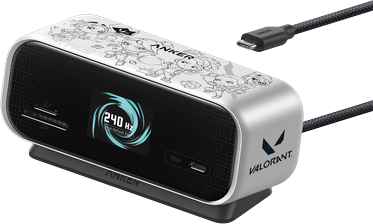
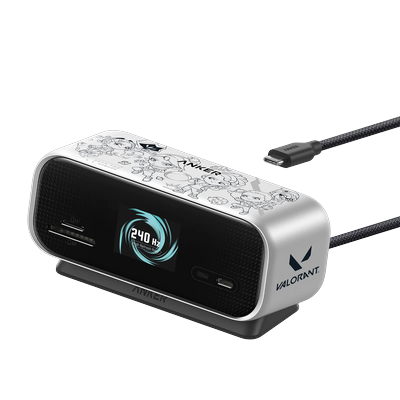
Anker Desktop USB-C Hub (VALORANT Limited Edition)Authentic VALORANT-Inspired Design: This limited edition pairs iconic Agent artwork with precision-engraved detailing and a premium finish—a desk centerpiece that shows your allegiance before the match even starts. Pick Your Agent, Set Your Theme:...79,99 $*Shipping: 0,00 $Secure redirect to the provider
-
Anker Desktop USB-C Hub 【VALORANT Edition】Starlight Silver (No Charger)All-in-One Connectivity: The 10-in-1 design features one HDMI 2.1 port, one DisplayPort 1.4 port, one 100W max PD-IN port for up to 80W host charging, one 10 Gbps USB-C port, one 10 Gbps USB-A data port, two 5 Gbps USB-A ports, one Gigabit Ethernet...109,99 $*Shipping: 0,00 $Secure redirect to the provider
-
Uplift Essentials Digital Online Water PH Quality Monitor Digital Online Water PH Quality MonitorKeep continuous, realtime track of your water's chemical balance with this digital online pH monitor. Engineered for continuous 247 monitoring, this highprecision testing system features a durable, detachable BNCconnector pH probe that remains...134,97 $*Shipping: 0,00 $Secure redirect to the provider
-
Inspire Curations Online Digital EC TDS Water Quality Monitor trm1 Tds MonitorMonitor water conditions conveniently with this digital EC TDS meter, designed for continuous online waterquality testing. The LCD display provides clear readings for conductivity and dissolved solids, helping users check water conditions without...235,50 $*Shipping: 0,00 $Secure redirect to the provider


-
Is an online payment secure?
Online payments can be secure if proper security measures are in place. This includes using secure websites with encryption, using trusted payment processors, and being cautious with sharing personal and financial information. It's important to look for the "https" in the website URL and a lock symbol in the address bar to ensure the website is secure. Additionally, using strong and unique passwords for online accounts can also help enhance security. **
-
Secure Boot is required for Valorant in some places.
Secure Boot is required for Valorant in some places because it is a security feature that helps prevent unauthorized software from running during the boot process. This helps ensure that the system is running trusted and verified software, which can help protect against malware and other security threats. Valorant may require Secure Boot in certain regions to ensure a more secure gaming environment for players. **
-
How do I activate the secure mode for Valorant?
To activate the secure mode for Valorant, you can follow these steps: 1. Open the Valorant game client and log in to your account. 2. Click on the gear icon in the top right corner to open the settings menu. 3. In the settings menu, go to the "General" tab and scroll down to find the "Secure Mode" option. 4. Toggle the "Secure Mode" option to the on position to activate it. Once you have activated secure mode, your account will have an extra layer of protection against unauthorized access and potential security threats. **
-
How do I pay for Valorant if I use my mobile number as a payment method in Valorant?
If you use your mobile number as a payment method in Valorant, you can pay for in-game purchases through carrier billing. This means that the charges for your purchases will be added to your monthly mobile phone bill or deducted from your prepaid balance, depending on your mobile service provider. When you make a purchase in Valorant, you will receive a confirmation message on your mobile phone, and the charges will be reflected in your next billing cycle or deducted from your prepaid balance. **


How do I activate TPM 2.0 and Secure Boot in Valorant?
To activate TPM 2.0 and Secure Boot in Valorant, you will need to access your computer's BIOS or UEFI settings. Restart your computer and press the designated key (often F2, F10, or Del) to enter the BIOS/UEFI. Once in the settings, navigate to the Security or Boot options and look for the TPM and Secure Boot settings. Enable TPM 2.0 and Secure Boot if they are not already activated, then save and exit the BIOS/UEFI. After making these changes, you should be able to play Valorant with TPM 2.0 and Secure Boot activated. **
Is Valorant fun?
Opinions on whether Valorant is fun can vary depending on individual preferences. Some players find the fast-paced gameplay, strategic elements, and teamwork required in Valorant to be enjoyable and engaging. Others may not find it as fun due to the competitive nature of the game or the steep learning curve required to master its mechanics. Ultimately, whether Valorant is fun or not is subjective and can differ from person to person. **
Top-Angebote
Products related to Valorant:
-
Anker Laptop Charger Pro VALORANTExtend Your Laptop Battery Lifespan by Up to 40%*: Once connected, the charger recognizes your laptop model and offers two charging modes: Auto Mode for fast charging and Care Mode, which applies a laptop-specific charging curve for long-term...59,99 $*Shipping: 0,00 $Secure redirect to the provider
-
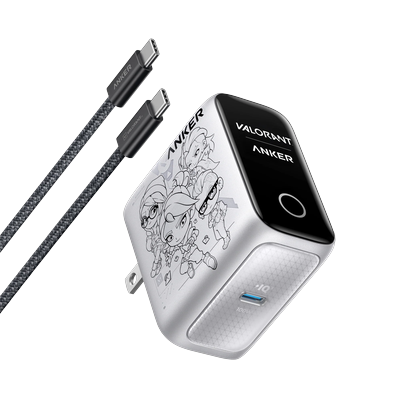
Anker Laptop Charger Pro (VALORANT Limited Edition)Authentic VALORANT-Inspired Design: Featuring 8 iconic Agents in intricate, dimensional UV-printed designs across both sides. The port side features a classic VALORANT grid pattern with an iridescent electroplated finish for added visual depth and...59,99 $*Shipping: 0,00 $Secure redirect to the provider
-
Anker Desktop USB-C Hub (VALORANT Limited Edition)Authentic VALORANT-Inspired Design: This limited edition pairs iconic Agent artwork with precision-engraved detailing and a premium finish—a desk centerpiece that shows your allegiance before the match even starts. Pick Your Agent, Set Your Theme:...79,99 $*Shipping: 0,00 $Secure redirect to the provider
-
Anker Desktop USB-C Hub 【VALORANT Edition】Starlight Silver (No Charger)All-in-One Connectivity: The 10-in-1 design features one HDMI 2.1 port, one DisplayPort 1.4 port, one 100W max PD-IN port for up to 80W host charging, one 10 Gbps USB-C port, one 10 Gbps USB-A data port, two 5 Gbps USB-A ports, one Gigabit Ethernet...109,99 $*Shipping: 0,00 $Secure redirect to the provider
-
How can one start Valorant without Secure Boot?
To start Valorant without Secure Boot, you can disable Secure Boot in your computer's BIOS settings. First, restart your computer and enter the BIOS settings by pressing the designated key (often F2, F10, or Del) during the boot process. Once in the BIOS settings, navigate to the Secure Boot option and disable it. Save the changes and exit the BIOS settings. After doing this, you should be able to start Valorant without Secure Boot enabled. Keep in mind that disabling Secure Boot may have security implications, so it's important to weigh the risks before making this change. **
-
How can one play Valorant without Secure Boot?
To play Valorant without Secure Boot, you can disable Secure Boot in your computer's BIOS settings. This will allow you to bypass the Secure Boot requirement and launch the game. However, keep in mind that disabling Secure Boot can make your system more vulnerable to certain types of malware and security threats. It is recommended to re-enable Secure Boot after playing Valorant to ensure the security of your system. **
-
Is an online payment secure?
Online payments can be secure if proper security measures are in place. This includes using secure websites with encryption, using trusted payment processors, and being cautious with sharing personal and financial information. It's important to look for the "https" in the website URL and a lock symbol in the address bar to ensure the website is secure. Additionally, using strong and unique passwords for online accounts can also help enhance security. **
-
Secure Boot is required for Valorant in some places.
Secure Boot is required for Valorant in some places because it is a security feature that helps prevent unauthorized software from running during the boot process. This helps ensure that the system is running trusted and verified software, which can help protect against malware and other security threats. Valorant may require Secure Boot in certain regions to ensure a more secure gaming environment for players. **
Similar search terms for Valorant
-
Uplift Essentials Digital Online Water PH Quality Monitor Digital Online Water PH Quality MonitorKeep continuous, realtime track of your water's chemical balance with this digital online pH monitor. Engineered for continuous 247 monitoring, this highprecision testing system features a durable, detachable BNCconnector pH probe that remains...134,97 $*Shipping: 0,00 $Secure redirect to the provider
-
Inspire Curations Online Digital EC TDS Water Quality Monitor trm1 Tds MonitorMonitor water conditions conveniently with this digital EC TDS meter, designed for continuous online waterquality testing. The LCD display provides clear readings for conductivity and dissolved solids, helping users check water conditions without...235,50 $*Shipping: 0,00 $Secure redirect to the provider
-
Uplifted Finds Online Digital EC Meter Water Quality Tester Electrical Conductivity Monitor For Filtration Systems & Pools Online Digital EC Meter Water Quality Tester Electrical Conductivity Monitor For Filtration Systems & PoolsEnsure optimal water purity, filter performance, and chemical balance with this Online Digital Electrical Conductivity (EC) Water Quality Tester. Engineered for continuous realtime monitoring, this highprecision inline monitor measures electrical...210,97 $*Shipping: 0,00 $Secure redirect to the provider
-
Grand Theft Auto V: Premium Online Edition Rockstar Digital Download CD Key GlobalGrand Theft Auto V: Premium Online Edition CD Key (PC / Global) Experience Rockstar Games' critically acclaimed open-world masterpiece with Grand Theft Auto V: Premium Online Edition . This definitive package includes the complete Grand Theft Auto V story experience, free access to the ever-evolving Grand Theft Auto Online, and all existing gameplay upgrades and content. As a massive bonus for new players, it features the Criminal Enterprise Starter Pack , the fastest way to jumpstart your criminal empire in GTA Online with $1,000,000 bonus cash and over $10,000,000 in total value of properties, businesses, weapons, and vehicles. Key Features & Included Content The Complete Story Experience: Explore the sprawling, interconnected lives of Franklin, Michael, and Trevor across the massive sun-drenched metropolis of Los Angeles and Blaine County. Grand Theft Auto Online: Rise through the ranks of the criminal underworld alongside millions of players in a dynamic, continuously updated online multiplayer world. Criminal Enterprise Starter Pack: Instantly acquire high-value assets including a Maze Bank West Executive Office, a Paleto Forest Gunrunning Bunker, a fleet of high-performance vehicles, and tactical weapons. Global Digital CD Key: Activate your game seamlessly from anywhere in the world on the official Rockstar Games Launcher platform without any regional restrictions.17,87 £*Shipping: 0,00 £Secure redirect to the provider
-
How do I activate the secure mode for Valorant?
To activate the secure mode for Valorant, you can follow these steps: 1. Open the Valorant game client and log in to your account. 2. Click on the gear icon in the top right corner to open the settings menu. 3. In the settings menu, go to the "General" tab and scroll down to find the "Secure Mode" option. 4. Toggle the "Secure Mode" option to the on position to activate it. Once you have activated secure mode, your account will have an extra layer of protection against unauthorized access and potential security threats. **
-
How do I pay for Valorant if I use my mobile number as a payment method in Valorant?
If you use your mobile number as a payment method in Valorant, you can pay for in-game purchases through carrier billing. This means that the charges for your purchases will be added to your monthly mobile phone bill or deducted from your prepaid balance, depending on your mobile service provider. When you make a purchase in Valorant, you will receive a confirmation message on your mobile phone, and the charges will be reflected in your next billing cycle or deducted from your prepaid balance. **
-
How do I activate TPM 2.0 and Secure Boot in Valorant?
To activate TPM 2.0 and Secure Boot in Valorant, you will need to access your computer's BIOS or UEFI settings. Restart your computer and press the designated key (often F2, F10, or Del) to enter the BIOS/UEFI. Once in the settings, navigate to the Security or Boot options and look for the TPM and Secure Boot settings. Enable TPM 2.0 and Secure Boot if they are not already activated, then save and exit the BIOS/UEFI. After making these changes, you should be able to play Valorant with TPM 2.0 and Secure Boot activated. **
-
Is Valorant fun?
Opinions on whether Valorant is fun can vary depending on individual preferences. Some players find the fast-paced gameplay, strategic elements, and teamwork required in Valorant to be enjoyable and engaging. Others may not find it as fun due to the competitive nature of the game or the steep learning curve required to master its mechanics. Ultimately, whether Valorant is fun or not is subjective and can differ from person to person. **
* All prices are inclusive of VAT and, if applicable, plus shipping costs. The offer information is based on the details provided by the respective shop and is updated through automated processes. Real-time updates do not occur, so deviations can occur in individual cases. ** Note: Parts of this content were created by AI.